Ice Cream Sandwich has been a big hit with users, and many just can’t wait for ICS to land on their devices. Unfortunately, the waiting list is a pretty long one for devices that don’t have it already, and most are depending on the likes of CyanogenMod and leaks to get their fill of ICS.
Now, you have the ability to install the new launcher, running with gingerbread
and android 4 (ice cream sandwich), made for LDPI, MDPI and HDPI devices.
Here, you can test the free launcher version - stripped off by removed
settings, dockbar styles and workspace overviews.
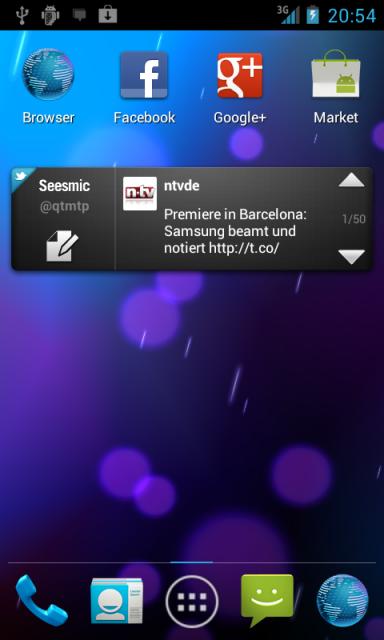
The free version have following features:
- 5 workspaces
- all android 4 wallpapers
- default ICS (android 4) dockbar style
- home hardware key brings you to the workspaces overview
The full version on the android market has all features:
- All android 4 image wallpapers
- Choice between 3,5,7 or 9 workspaces
- Set your favorite workspace screen as default "home"
- Use workspace overviews to quickly snap to your wanted screen
- Choose between 2 hardware home key actions
- Choose between 9 different dockbar styles
- Enable or disable wallpaper scroll
- Show or hide the workspace indicator
- Enable or disable icon text backgrounds
Planned next features:
- Editable dock apps
- (Re-)moveable Folder icons
- Landscape mode, Support for X-HDPI and tablet devices
- Endless workspace scroll
- workspace and app drawer transitions
~~~~~ INSTALLATION ~~~~~
THIS APPLICATION IS INTEND TO BE USED ON A ROOTED DEVICE ONLY!
If you have downloaded this application, open a root file explorer or the ADB shell
and move the app to /system/app BEFORE you start the launcher the first time! Otherwise
you cant use widgets shown in the Application drawer. Its required because of a general
permission in the Android operating system, this can never be fixed by me!
Make sure, your system partition is mounted in read/write mode when moving the app!
If you get Force Close errors the first time you start the launcher, try to set the
permission for /data/dalvik-cache to 777, this fixes the first time start error.
See this post attachement to download the full functional free version.
Changelog:
----------
0.9.7.2:
Fixed: NullPointer Exception when pick unknown widget
Fixed: Thread Exception when removing a package
Fixed: Folder labels were not saved to database
Fixed: Click on icon in a folder should close the folder
Added: Full LDPI support (both small and normal screen resolution)
Added: 2 more workspaces, default is now workspace #3 (free version)
0.9.7:
- Fixed FC in wallpaper chooser (free version)
0.9.6:
- Fixed FCs when start the launcher
- Support for Gingerbread 2.3.4 again
0.9.5:
- Removed compatibility for Android versions prior to 2.3.7, needs to be fixed.
- Fixed MDPI cell sizes
- Improved performance
- Fixed some small bugs
DOWNLOAD:
Full Version
Free Version
Now, you have the ability to install the new launcher, running with gingerbread
and android 4 (ice cream sandwich), made for LDPI, MDPI and HDPI devices.
Here, you can test the free launcher version - stripped off by removed
settings, dockbar styles and workspace overviews.
The free version have following features:
- 5 workspaces
- all android 4 wallpapers
- default ICS (android 4) dockbar style
- home hardware key brings you to the workspaces overview
The full version on the android market has all features:
- All android 4 image wallpapers
- Choice between 3,5,7 or 9 workspaces
- Set your favorite workspace screen as default "home"
- Use workspace overviews to quickly snap to your wanted screen
- Choose between 2 hardware home key actions
- Choose between 9 different dockbar styles
- Enable or disable wallpaper scroll
- Show or hide the workspace indicator
- Enable or disable icon text backgrounds
Planned next features:
- Editable dock apps
- (Re-)moveable Folder icons
- Landscape mode, Support for X-HDPI and tablet devices
- Endless workspace scroll
- workspace and app drawer transitions
~~~~~ INSTALLATION ~~~~~
THIS APPLICATION IS INTEND TO BE USED ON A ROOTED DEVICE ONLY!
If you have downloaded this application, open a root file explorer or the ADB shell
and move the app to /system/app BEFORE you start the launcher the first time! Otherwise
you cant use widgets shown in the Application drawer. Its required because of a general
permission in the Android operating system, this can never be fixed by me!
Make sure, your system partition is mounted in read/write mode when moving the app!
If you get Force Close errors the first time you start the launcher, try to set the
permission for /data/dalvik-cache to 777, this fixes the first time start error.
See this post attachement to download the full functional free version.
Changelog:
----------
0.9.7.2:
Fixed: NullPointer Exception when pick unknown widget
Fixed: Thread Exception when removing a package
Fixed: Folder labels were not saved to database
Fixed: Click on icon in a folder should close the folder
Added: Full LDPI support (both small and normal screen resolution)
Added: 2 more workspaces, default is now workspace #3 (free version)
0.9.7:
- Fixed FC in wallpaper chooser (free version)
0.9.6:
- Fixed FCs when start the launcher
- Support for Gingerbread 2.3.4 again
0.9.5:
- Removed compatibility for Android versions prior to 2.3.7, needs to be fixed.
- Fixed MDPI cell sizes
- Improved performance
- Fixed some small bugs
DOWNLOAD:
Full Version
Free Version