Search

Tampilkan postingan dengan label Samsung Galaxy S2. Tampilkan semua postingan

[News]Ice Cream Sandwich update now rolling out to European Samsung Galaxy S II

Diposting oleh fatih on Senin, 12 Maret 2012


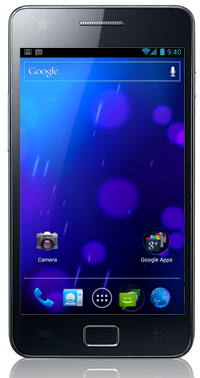
It looks like the Korean version of the Galaxy S II won’t be the only one to receive the Android 4.0(ICS) update today. According to Samsung Mobile’s Facebook page, Galaxy S II owners living in Poland, Hungary and Sweden are set to receive ICS today. We are still wondering if other parts of Europe will also get first dibs at the update.
Other Samsung devices such as the Galaxy Note, Galaxy S II LTE, Galaxy Tab 8.9 and 10.1 will be next in line to get the update. However, no details were given about when it will be rolled out.
Folks who own the Galaxy S II in other parts of the world, including the U.S. where we have multiple variants of the phone, will start receiving Android 4.0 updates depending on how fast their wireless carriers test them and make them ready for consumption.
The race to roll out the update is on for AT&T, Sprint and T-Mobile and we sure hope that they won’t make us wait until the next quarter. Who do you think will be first?
Read More

Samsung I9100 Galaxy S II will get ICS on March 10

Diposting oleh fatih on Jumat, 09 Maret 2012

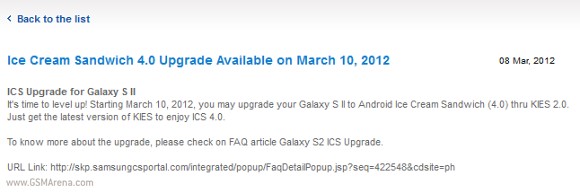
Just as we were getting ready to get it on March 15, we got even better news. Samsung I9100 Galaxy S II will be receiving an update to Android 4.0 Ice Cream Sandwich on March 10 - less than 48 hours from now.
Update: Samsung used its Twitter account to deny the statement of its website. It turns out the ICS update release date is still not settled and it will be announced at a later point in time.
The globally available I9100 will be the only version, which will receive the update at the moment. The TouchWiz-ed firmware will be available both on Kies and OTA.
As you can see in the screenshot above, Face Unlock, Android Beam, and mobile data usage are among the major improvements which will come with the update. In a rather interesting fashion, flash support and Bluetooth 3.0 HS will not be supported due to an "ICS OS feature."
Samsung also warn against updating your device while running a customized or unofficial firmware on it. Apparently, unexpected problems might arise during installation.
It is needless to tell you that we will be checking regularly our office I9100 for the update. In case you upgrade your own handset, feel free to drop us a line with your impressions in the comments section. 
Thanks to everyone, who sent this in!
Read More

News : Android 4.0 update for Galaxy S II said to arrive on March 15

Diposting oleh fatih on Senin, 05 Maret 2012

The Android 4.0 Ice Cream Sandwich update for the Samsung Galaxy S II has been a long time coming but it seems that the wait is soon to get over. Although Samsung did earlier mention that the S II, along with a few other Samsung devices will be getting the update sometime in March, it did not provide the actual date.
Now, however, a Samsung importer in Isreal called Sunny Communications have revealed on its Facebook page that the update will arrive on March 15, just over a week from today. Here is the translated quite from Facebook:
We promised that we're working on it. You waited patiently. On 15 March it comes: the Android version 4, ICS, tens of thousands of the devices purchased GALAXY SII cellular companies in the country or directly from us. We here are very excited for the launch, hope you :)
This does not mean, however, that all Galaxy S II devices will get the update on March 15. Some may get it later or probably, some may even get it sooner, with the date mentioned above probably being only for the Israeli market. Either way, you won't be having to wait too long now.
Read More

[NEWS][ROM]A new unofficial ROM lets you taste the MIUI flavor of Ice Cream Sandwich on your Galaxy S II

Diposting oleh fatih on Selasa, 24 Januari 2012

[ROM][24-01-2012][4.0.3][RC1]MIUI v4 Fresh v2.1 (Update v1 Added)(VERY STABLE)

Hey,

FEATURES

Version 2.1 Changelog

- Based off MIUI Android v2.1.20 (Thanks MIUI and MIUI Android) and CyanogenMod 9 Alpha 01172012 build (Thanks Team Hacksung and CyanogenMod)
- KP9 Kernel - Due to data issues with later versions (Thanks Codeworkx again)
- Camera from CyanogenMod - Supports 8MP
- Fixed External SD not being read, now both Music app and Storage in Settings read it
- Added some build.prop tweaks (Better Speed and optimization)
- Fixed Storage view - Now shows both internal and external SD Card
- SQLite3 upgraded to latest version (Better database Handling)
- Added TitaniumBackup v4.7.5
- Other features, i don't remember right now, but will update as soon as I Can

Official ICS Changelog (2.1.20):
[Recommended updates]
Added new guest mode with password / pattern lock support
New dial-up interface utilising T9 search functions. Results support Service provider details

[Phone]
New dialup interface using T9 search, the results support the display of Phone Service providers (such as type 9555, matching the bank will contact the following telephone and other services)

[Backup manager]
Added support to store reminder notes

[Access control]
Added new guest mode password and pattern lock support

The File Manager still doesn't have support for external sd... I'm trying to code it in, but apktool continues to fail.
I'll also update the OP with other stuff as soon as I complete my sleep! Am running 29 hours without it, thanks to the virus that Android is...


DOWNLOADS!

DOWNLOAD HERE - V2.1

INSTALLATION STEPS
1. Copy zip file to /sdcard.
2. Reboot to Recovery
3. Wipe Data/Factory Reset
4. Go to Mounts and Storage, Wipe System...
5. Install zip from sdcard - Version 2.1
7. Wipe Data/Factory Reset AGAIN.
8. Reboot.

KNOWN ISSUES

- MIUI Themes don't work. Create /data/system/theme to get it to work!
- Initially the permissions manager will ask for permission to Manage ROOT. Permit that.

Screenshots


1. Uploaded a new update v1 for Latest Version!

Contents

Camera supporting 8 MP from CyanogenMod
Monitor.apk - For Data Usage (It still FCs in Settings... Use app from Tools Folder)
Root Browser.apk - Root Browser Lite
Titanium Backup.apk - Titanium Backup Latest version!

Flash like normal over existing install from CWM.

CLICK HERE TO DOWNLOAD


2. Temporary SMS Fix!

Go to Messaging app > Settings > Message Style > Change Bubble to List!

NO MORE SMS RESEND ERRORS 


3. DOWNLOAD LINK FOR GAPPS v10

CLICK HERE


MOUNT FIX - Change SD Card to Read as EMMC and EMMC as SD Card - Helps to see EMMC directly from File Explorer!

http://www.mediafire.com/?undefined - To swap EMMC with SDCARD!!

http://www.mediafire.com/?81df8dd1gdosp3o - To Restore back to original!!

KP8 Kernel - With Mounts Fixed

I used KP8 Kernel for a couple of hours, maybe its just a placebo, but I found the battery to be draining less than KP9 for me atleast. Modem in use KI3, Rom - AdyScorpiusMIUI v2.1 with all the jazz installed and running..

So basically, took the plunge, and uploading a KP8 Kernel flashing CWM, alongwith the files to be changed in framework etc to get the storage, media etc running intact. Flash after flashing the ROM...

Download HERE!

lossary!
ORD - Obsessive ROM-Updating Disorder!

You want the best experience from the ROM - Speed/Optimized/Stability!
Follow this to the T.

1. Flash the ROM after wiping data/cache/system.
2. After reboot, don't touch the phone, screen, anything for the first 10 minutes!
- Exception - If there's a Google Start page(Like on v2.0) wait for 2 minutes, then go through the initial pages, till you reach the Home Launcher, and then let it idle for 10 minutes! (DO NOT CONFIGURE GOOGLE ACCOUNT RIGHT NOW. 
3. Reboot
4. Now, configure your Wifi(If you feel like, else 3G/2G's good), and configure Google Account and repeat the 10 minutes wait. 
5. Reboot again.
6. Now install/restore apps from Titanium Backup or whatever place you choose to from. However, avoid restoring data as much as you can! Different bases have different structures, and can cause corruption!
7. Reboot to Recovery
8. Wipe Cache, Dalvik Cache, Fix Permissions.
9. ENJOY !!! 

I have used these steps ever since Eclair on a Samsung Galaxy S Vibrant, and they've never failed me...


FIX THE BATTERY DRAIN

If its Terrible!
1. Backup your Memory SDs...
2. Format your SD Card and External SD Partition.
3. Restore just the images, songs, Titanium Backup Folder, clockworkmod backups. Avoid the other folders that can possibly contain corrupt files, specially those made by unstable apks.
4. You should have a major difference in battery life.

If its not so Terrible!

1. Go to SD Card, wipe/delete the following folders
- /sdcard/Android/Data/com.android.providers.media
- /sdcard/Android/Data/com.cooliris.media
- /sdcard/Android/Data/com.google.android.gallery3d
- /sdcard/Android/Data/com.android.providers.media
- /sdcard/AndroidThemes (Its only a backup, not required if your ROM is fine)
- /sdcard/Android/DCIM/.thumbnails
- /sdcard/Android/DCIM/100ANDRO
- /sdcard/LOST.DIR

Reboot, and let it stay for 10 minutes! (Building thumbnails etc.)
Reboot again... ENJOY!
Read More