Search

Tampilkan postingan dengan label launcher. Tampilkan semua postingan

[APP] PhoenixLauncher for Gingerbread & ICS

Diposting oleh fatih on Sabtu, 10 Maret 2012


Ice Cream Sandwich has been a big hit with users, and many just can’t wait for ICS to land on their devices. Unfortunately, the waiting list is a pretty long one for devices that don’t have it already, and most are depending on the likes of CyanogenMod and leaks to get their fill of ICS.
Now, you have the ability to install the new launcher, running with gingerbread
and android 4 (ice cream sandwich), made for LDPI, MDPI and HDPI devices.

Here, you can test the free launcher version - stripped off by removed
settings, dockbar styles and workspace overviews.
PhoenixLauncher Gives Gingerbread Users a Taste of ICS
The free version have following features:
- 5 workspaces
- all android 4 wallpapers
- default ICS (android 4) dockbar style
- home hardware key brings you to the workspaces overview

The full version on the android market has all features:

- All android 4 image wallpapers
- Choice between 3,5,7 or 9 workspaces
- Set your favorite workspace screen as default "home"
- Use workspace overviews to quickly snap to your wanted screen
- Choose between 2 hardware home key actions
- Choose between 9 different dockbar styles
- Enable or disable wallpaper scroll
- Show or hide the workspace indicator
- Enable or disable icon text backgrounds

Planned next features:
- Editable dock apps
- (Re-)moveable Folder icons
- Landscape mode, Support for X-HDPI and tablet devices
- Endless workspace scroll
- workspace and app drawer transitions

~~~~~ INSTALLATION ~~~~~

THIS APPLICATION IS INTEND TO BE USED ON A ROOTED DEVICE ONLY!

If you have downloaded this application, open a root file explorer or the ADB shell
and move the app to /system/app BEFORE you start the launcher the first time! Otherwise
you cant use widgets shown in the Application drawer. Its required because of a general 
permission in the Android operating system, this can never be fixed by me!
Make sure, your system partition is mounted in read/write mode when moving the app!

If you get Force Close errors the first time you start the launcher, try to set the
permission for /data/dalvik-cache to 777, this fixes the first time start error.

See this post attachement to download the full functional free version.

Changelog:
----------

0.9.7.2:
Fixed: NullPointer Exception when pick unknown widget
Fixed: Thread Exception when removing a package
Fixed: Folder labels were not saved to database
Fixed: Click on icon in a folder should close the folder
Added: Full LDPI support (both small and normal screen resolution)
Added: 2 more workspaces, default is now workspace #3 (free version)

0.9.7:
- Fixed FC in wallpaper chooser (free version)

0.9.6:
- Fixed FCs when start the launcher
- Support for Gingerbread 2.3.4 again

0.9.5:
- Removed compatibility for Android versions prior to 2.3.7, needs to be fixed.
- Fixed MDPI cell sizes
- Improved performance
- Fixed some small bugs

DOWNLOAD:

Full Version
Free Version
Read More

Business Go Launcher EX Theme V1.6 (1.6) Android Apk

Diposting oleh fatih on Kamis, 09 Februari 2012


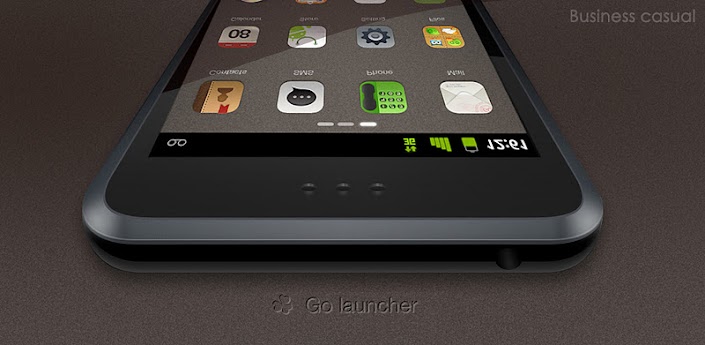
Business Go Launcher EX Theme 1.6
Needs: Android 2.0+
Summary: Business Go Launcher EX theme!

Business Go Launcher EX Theme

- more than 40 Icon
-For business professionals GO launcher Theme
- classic business style

===>Important tips: 
1. Make sure the latest version of GO Launcher EX has been installed! 
2. Apply the Theme: MENU->Themes->Choose “Classic” theme. 
3. Search “GO Launcher EX Theme” in the Android Market to get more fantastic themes. 
4. The weather and clock widget in screenshots belongs to GO Weather, Search “GO Weather” to download if you like. 
5. Other useful widgets in screenshots are our GOwidgets.

Download:
http://extabit.com/file/27au8yo4geeev
Read More

GO Launcher EX V2.78 Final (2.78) Android Apk App

Diposting oleh fatih

GO Launcher EX 2.78 Beta Needs Android 2.1 and higher devices.

GO Launcher EX

Hosts: Direct Link.
Summary: GO Launcher EX is the extended version of GO Launcher. It’s a highly customizable home replacementapplication, which will run when you press your android phone’s HOME key. GO Launcher EX supports hundreds of themes, fast flip speed and tons of useful functions.
File Name: GO_Launcher_EX_V2.78Beta1.apk
File Size: 4.40 MB

Features:
- Hundreds of themes
- Fancy home screen transition
- Smooth scrolling experience
- Icon popup menu
- Folder and task manager in app drawer
- Gesture supported
- Scrollable & resizable widgets supported

Tips: 
1. Pinch fingers to enter preview screen and edit home screen pages
2. Search “go launcher theme” to get themes and select them in “Themes preferences”
3. Set screen transition and flip speed in “Display settings”
4. Long press icons on home screen to active popup menu
5. Long press icons in app drawer to edit location, uninstall apps and create folders
6. If you can't set GO Launcher as your default home, download "Home manager"

Important:
we need directly call phone numbers permission to enable the direct dial shortcut on home screen.
2. We will bring out some charged apps like themes and widgets, but most of our apps are free!
3. The weather and clock widget in screenshots belongs to GO Weather, one of the applications developed by our team!
4. The other widgets in screenshots are our GOwidgets.

Recent changes:
1. (New) Click on search button to enter app search in app drawer (also available by long pressing menu button)
2. (Improve) Operation experience and UI details of app search
3. (Improve) Home screen grids when moving icons and widgets
4. (Fix) Blur error after custom the color of app label
5. (Fix) No content error when enter the GO widget list


Download: GO Launcher EX v2.78
Final:
http://www.mirrorcreator.com/files/0EEHUFON/go_launcher_ex_v2.78.apk_links

Beta 5:
http://61.145.124.93/soft/3GHeart/golauncher/v2.78/GO_Launcher_EX_V2.78Beta5.apk

Beta 4:
http://61.145.124.93/soft/3GHeart/golauncher/v2.78/GO_Launcher_EX_V2.78Beta4.apk

Beta 3:
http://61.145.124.93/soft/3GHeart/golauncher/v2.78/GO_Launcher_EX_V2.78Beta3.apk

Beta 2:
http://61.145.124.93/soft/3GHeart/golauncher/v2.78/GO_Launcher_EX_V2.78Beta2.apk

Beta 1
http://61.145.124.93/soft/3GHeart/golauncher/v2.78/GO_Launcher_EX_V2.78Beta1.apk
Read More

Nemus Launcher V1.5.4 (1.5.4) Android Apk App

Diposting oleh fatih


Nemus Launcher v1.5.4 (1.5.4) Android Apk App:
Nemus Launcher 1.5.4 Needs Android os 2.1 and higher devices.

Nemus Launcher

hosts: turbobit.net, megashare.com, letitbit.net.
Summary: A Home replacement Application.
File Name: nl154.apk 
File Size: 1,51 Mb

A Home replacement Application with
- Low memory usage
- Quick response
- Easy App finding/management
- Easy Workspace management
- Easy Folder management

[Features]
- Widget Resizing
- Themes (native ZIP themes & SSKIN themes downloadable from market)
- 1 to 9 workspaces
- Various App list styles
- Expandable folders in workspace & app list
- Workspace and app menu switchers (screen preview)
- Highlight recently used apps
- Scrollable bottom docks / QuickSetting docks
- Scrollable widgets
- App-Hide&Lock / Screen-Lock

[Working On]
- Additional types of theme
- Backup/Restore/Share settings

What's in this version:
New :
Folder on the DockBar
Improve :
Folder graphics
Fix :
Dock icons layout for large screen devices
Hidden app re-appearing when the app updated
Theme apply screen layout for QVGA screen
OptionsMenu duplication after system locale change
Change :
Lock mode notification icon removed
AppDrawer sorting
'PerfomanceSetting > HighQualityImages' removed for Android 3.0+ devices
Localization updated from users:
fr, ru, ja, nl, zh_CN, pl, bg, pt_PT, el, es_MX, hu, tr


Download:
http://turbobit.net/pk8x42afviwz.html

Mirror:
http://letitbit.net/download/02575.0159f07b40d54bf7ce47dd342e58/nl154.apk.html
http://www.MegaShare.com/3915186
Read More

i2Theme v13.0 (ADW, LauncherPro Plus) (14.0) Android Apk

Diposting oleh fatih


i2Theme 13.2 (ADW, LauncherPro Plus, MIUI) Requires Android (With ADW Launcher or LauncherPro Plus or MIUI Installed)
Overview: One of the best theme for ADW Launcher !


- standard notification bar
- 1313 iphone style icons
- 0018 iphone style docks [for ADW Launcher EX users]
- 0034 wallpapers
- icon pack

ADW Launcher EX (old version)
to change the dock, do: ADWSettings / UI Setttings / Main Dock / Dock Background / Custom... / ADW i2Theme
if the dock dont change, do: ADWSettings / Restart ADW

ADW Launcher EX 1.3.3 (new version)
to change the dock, do: ADWSettings / Themes Preferences / Main dock / Custom... /ADW i2theme

LauncherPro Plus v0.8.6
to load the theme, do: LauncherPro Plus Preferences / Themes Settings / Icon Pack / ADW i2theme

v14.0
-added icons request by users

Download:
http://www.sendspace.com/file/2nxnfk

Read More

[Guide][MOD] How to Mod Espier Launcher

Diposting oleh fatih on Selasa, 31 Januari 2012


After receiving many questions on how I modded my Espier Launcher.apk I decided to write this tutorial. Many thanks to Taine0 for inspiration and initial instructions!


WHAT THIS GUIDE IS FOR:
-How to change icons in espier launcher
-How to change page indicators
-How to change dock
-How to change notification bubble
-How to add custom icons (for apps not natively themed by espier launcher) RECENTLY EDITED
-How to install onto phone

A. Preliminary Steps:

1. Install apktool

2. Create a directory called Espier launcher mod

3. Download Espier launcher and rename to launcher.apk

4. Place Espier Launcher into that directory.

5. Open terminal.

6. Change terminal directory to your Espier launcher mod folder.
E.G. I ran this:
Code:
cd /home/gaurav/Desktop/Espier launcher mod
7. Decompile the apk.
Code:
apktool d launcher.apk
B. Changing basic icons.

1. Open res/drawable-(hdpi/ldpi/mdpi/xhdpi) *depending on what screen size your phone is. I have an mdpi so i will go into drawble-mdpi

2. Change the desired icon
For example, the file
Code:
ic_com_android_camera_preparecamera.png
can be replaced by an image of the same (or similar) size. when you're done, it should look like: 

Screenshot

3. Refer to Section G

C. Changing page indicators

1. Open res/drawable-mdpi

2. Find the file:
Code:
ic_screen_level_focus.png 
ic_screen_level_normal.png
3. Replace these two files with desired ones

4. Open res/drawable-hdpi

5. Replace these files with desired images.
Code:
ic_screen_level_focus
ic_screen_level_normal.png
ic_screen_level_search_focus.png
ic_screen_level_search_normal.png
ic_screen_level_widget_focus.png
ic_screen_level_widget_normal.png
6. Refer to Section G.

D. How to change dock 

1. Navigate to res/drawable-mdpi (in my case)

2. Find file called
Code:
toolbar.png
3. Replace with desired (make sure the dock image is correct size for your phone)

4. Refer to Section G.

E. How to change notification bubble. 

1. Open res/drawable-mdpi

2. Find and replace with desired image
Code:
icon_shuzi1.png
3. Refer to Section G.

F. How to add custom icons

*Warning* This section is a lot more confusing. Please read carefully. *Warning*


1. Navigate to /res/values/arrays.xml

2. Now, it gets tricky. 

3. Go this website 

4. Search for an app. It should look like this: 

Screenshot

5. Now, in arrays.xml, scroll down until you see this type of coding

Screenshot

6. Get to the end of that "chunk" of xml.

7. Let's say we're theming the facebook app. So we add this to xml. (and fill it out with info) 
Code:
<item>ACTIVITY_OF_APP</item>
<item>DESCRIPTIVE_ACTIVITY_OF_APP</item>
<item>@drawable/NAME_OF_APP</item>
For example:
Code:
<item>com.facebook.katana</item>
<item>com.facebook.katana.LoginActivity</item>
<item>@drawable/facebook</item>
You get the first line of info like this: 

Screenshot

and the second:

Screenshot

in that third line of that xml we add (@drawable/NAME_OF_APP), you can name your app anything you want. i made it "facebook" in this case.

8. Save and exit.

9. Find a desired image for your application (in this case facebook).

10. Rename it to "NAME_OF_APP.png" in this case, "facebook.png"

11. Drop that file into drawable/mdpi

12. Repeat steps 1-11 for as many applications as you want to theme. 

13. Refer to Section G.

G. How to install on your phone

1. First, save and close everything you're working on.

2. Open your terminal, and change its directory to the "espier launcher mod" folder

3. Type in
Code:
apktool b 'PATH_TO/espier launcher mod' 1.apk
4. Take that 1.apk, and sign it, using a program like ApkSigner

5. Connect your phone to your computer via USB.

6. Mount it as a mass storage device.

7. Transfer that signed.apk to the root of your sdcard.

8. Now on your phone, uninstall any current version of EspierLauncher you may have.

9. Then, using a file manager, install the signed.apk from your sdcard.

YOU'RE DONE!
Read More